การจัดส่งสินค้าและการคืนสินค้า
Europe, UK: Tuesday, Jan 20 ~
USA: Saturday, Jan 17 ~
Australia: Monday, Jan 19 ~
Asia: Sunday, Jan 18
UAE: Monday, Jan 19
Order within 9 Hours 44 mins with Scheduled Delivery. If you place an order within this time, We will ship on Friday, Jan 16 2026 This delivery time is calculated by DHL and FedEx. You can check the exact delivery date on checkout page.
USA: Saturday, Jan 17 ~
Australia: Monday, Jan 19 ~
Asia: Sunday, Jan 18
UAE: Monday, Jan 19
Order within 9 Hours 44 mins with Scheduled Delivery. If you place an order within this time, We will ship on Friday, Jan 16 2026 This delivery time is calculated by DHL and FedEx. You can check the exact delivery date on checkout page.
การคุ้มครองผู้ซื้อ
คืนเงินเต็มจำนวนหากไม่ใช่ของแท้. คืนเงินเต็มจำนวนหรือบางส่วนหากรายการใหม่ไม่ตรงตามที่อธิบายไว้
รีวิวของลูกค้า (0 rating)
ความคิดเห็นสินค้าไม่มีในตอนนี้
คำอธิบายสินค้า (3,393 characters)
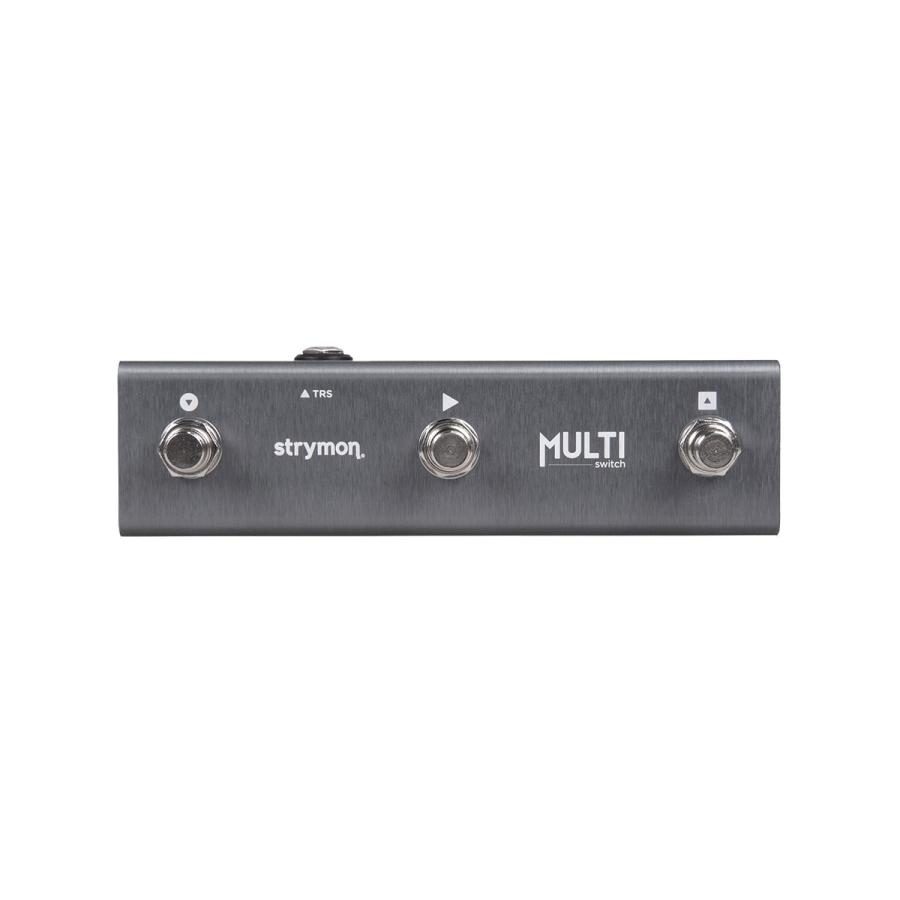
Want to expand the TimeLine Looper's control functionality and make even more use of the presets in TimeLine, BigSky, and Mobius? The MultiSwitch is the solution. Connect TimeLine, BigSky, and Mobius with the included stereo cable (approximately 40cm). This proposal unlocks new possibilities for your Strymon pedals.
■ Controls common to all models: Bank Mode: Freely move between presets. Preset Mode: Used for preset recall. Tap Mode: Used for preset scrolling and tap tempo.
■ Controls exclusive to TIMELINE: TimeLine Looper Control: Unlocks hidden functions such as reverse, 1/2 speed, and Undo/Redo, allowing you to choose between two usage modes (3-button looper and 6-button looper). This switch unlocks new possibilities for your Strymon pedals.
・Unit Listen to the page (external site) Features: Want to expand the TimeLine Looper's control functionality and make even more use of the presets in TimeLine, BigSky, and Mobius? The MultiSwitch is the solution. Connect the TimeLine, BigSky, and Mobius with the included stereo cable (approximately 40cm). This proposal unlocks new possibilities for your Strymon pedal. ■ Controls Shared by All Models: Bank Mode: Freely navigate between presets. Preset Mode: Used for preset recall. Tap Mode: Used for preset scrolling and tap tempo. ■ Controls Exclusive to TIMELINE: TimeLine Looper Control: Unlocks hidden functions such as reverse, 1/2 speed, and Undo/Redo, allowing you to choose between two looper modes (3-button looper and 6-button looper). Controls Shared by All Models: ■ Bank Mode: MultiSwitch offers an unconventional way to select preset banks. Use the left switch to bank down, and the right switch to back up. The center switch allows you to switch presets within a bank. Perfect for freely navigating between presets. ■ Preset Mode: MultiSwitch is used for preset recall. Saved presets can be selected using the left and right switches. The center switch toggles the effect on and off. ■ Tap Mode: Use this for scrolling through presets and tapping tempo. Its true value comes into its own when combined with TimeLine or Mobius. Use the left and right switches to scroll up and down through presets, and the center switch to tap in delay time and modulation speed. MultiSwitch, a control exclusive to TIMELINE, not only simplifies looper mode controls. It also unlocks hidden functions like reverse, 1/2 speed, and undo/redo. You can choose between two different uses, as shown below. ■ 3-Button Looper: Connect MultiSwitch to TimeLine to control Record/Overdub, Play, and Stop. This eliminates the need to hold the TAP switch on the TimeLine unit to access LOOPER mode. The switches on the TimeLine unit can be used freely to control the delay sound. ■ 6-Button Looper When you access LOOPER mode by holding the TimeLine's TAP switch, the MultiSwitch functions are assigned to REVERSE, 1/2 speed playback, and Undo/Redo. The 6-button looper makes live looping and other experimentation easy. No power required. Compatible models: TimeLine, BigSky, Mobius (connected to the Expression jack). EXPRESSION modes: LOOP control (TimeLine only), BANK mode, PRESET mode, TAP mode. Included accessories: Stereo cable with L-shaped plug (TRS: tip/ring/sleeve). Approximately 40cm. Dimensions: 168mm wide x 47mm deep x 5mm high (including protrusions). Made in USA. ■ Management code: 4560347887475
■ Controls common to all models: Bank Mode: Freely move between presets. Preset Mode: Used for preset recall. Tap Mode: Used for preset scrolling and tap tempo.
■ Controls exclusive to TIMELINE: TimeLine Looper Control: Unlocks hidden functions such as reverse, 1/2 speed, and Undo/Redo, allowing you to choose between two usage modes (3-button looper and 6-button looper). This switch unlocks new possibilities for your Strymon pedals.
・Unit Listen to the page (external site) Features: Want to expand the TimeLine Looper's control functionality and make even more use of the presets in TimeLine, BigSky, and Mobius? The MultiSwitch is the solution. Connect the TimeLine, BigSky, and Mobius with the included stereo cable (approximately 40cm). This proposal unlocks new possibilities for your Strymon pedal. ■ Controls Shared by All Models: Bank Mode: Freely navigate between presets. Preset Mode: Used for preset recall. Tap Mode: Used for preset scrolling and tap tempo. ■ Controls Exclusive to TIMELINE: TimeLine Looper Control: Unlocks hidden functions such as reverse, 1/2 speed, and Undo/Redo, allowing you to choose between two looper modes (3-button looper and 6-button looper). Controls Shared by All Models: ■ Bank Mode: MultiSwitch offers an unconventional way to select preset banks. Use the left switch to bank down, and the right switch to back up. The center switch allows you to switch presets within a bank. Perfect for freely navigating between presets. ■ Preset Mode: MultiSwitch is used for preset recall. Saved presets can be selected using the left and right switches. The center switch toggles the effect on and off. ■ Tap Mode: Use this for scrolling through presets and tapping tempo. Its true value comes into its own when combined with TimeLine or Mobius. Use the left and right switches to scroll up and down through presets, and the center switch to tap in delay time and modulation speed. MultiSwitch, a control exclusive to TIMELINE, not only simplifies looper mode controls. It also unlocks hidden functions like reverse, 1/2 speed, and undo/redo. You can choose between two different uses, as shown below. ■ 3-Button Looper: Connect MultiSwitch to TimeLine to control Record/Overdub, Play, and Stop. This eliminates the need to hold the TAP switch on the TimeLine unit to access LOOPER mode. The switches on the TimeLine unit can be used freely to control the delay sound. ■ 6-Button Looper When you access LOOPER mode by holding the TimeLine's TAP switch, the MultiSwitch functions are assigned to REVERSE, 1/2 speed playback, and Undo/Redo. The 6-button looper makes live looping and other experimentation easy. No power required. Compatible models: TimeLine, BigSky, Mobius (connected to the Expression jack). EXPRESSION modes: LOOP control (TimeLine only), BANK mode, PRESET mode, TAP mode. Included accessories: Stereo cable with L-shaped plug (TRS: tip/ring/sleeve). Approximately 40cm. Dimensions: 168mm wide x 47mm deep x 5mm high (including protrusions). Made in USA. ■ Management code: 4560347887475