Shipping and Returns
Europe, UK: Tuesday, Jan 20 ~
USA: Saturday, Jan 17 ~
Australia: Monday, Jan 19 ~
Asia: Sunday, Jan 18
UAE: Monday, Jan 19
Order within 9 Hours 13 mins with Scheduled Delivery. If you place an order within this time, We will ship on Friday, Jan 16 2026 This delivery time is calculated by DHL and FedEx. You can check the exact delivery date on checkout page.
USA: Saturday, Jan 17 ~
Australia: Monday, Jan 19 ~
Asia: Sunday, Jan 18
UAE: Monday, Jan 19
Order within 9 Hours 13 mins with Scheduled Delivery. If you place an order within this time, We will ship on Friday, Jan 16 2026 This delivery time is calculated by DHL and FedEx. You can check the exact delivery date on checkout page.
Buyer Protection
Full refund if not genuine. Full or partial refund, if the new item is not as described.
Customer Reviews (0 rating)
No reviews on this item...
Description (4,483 characters)
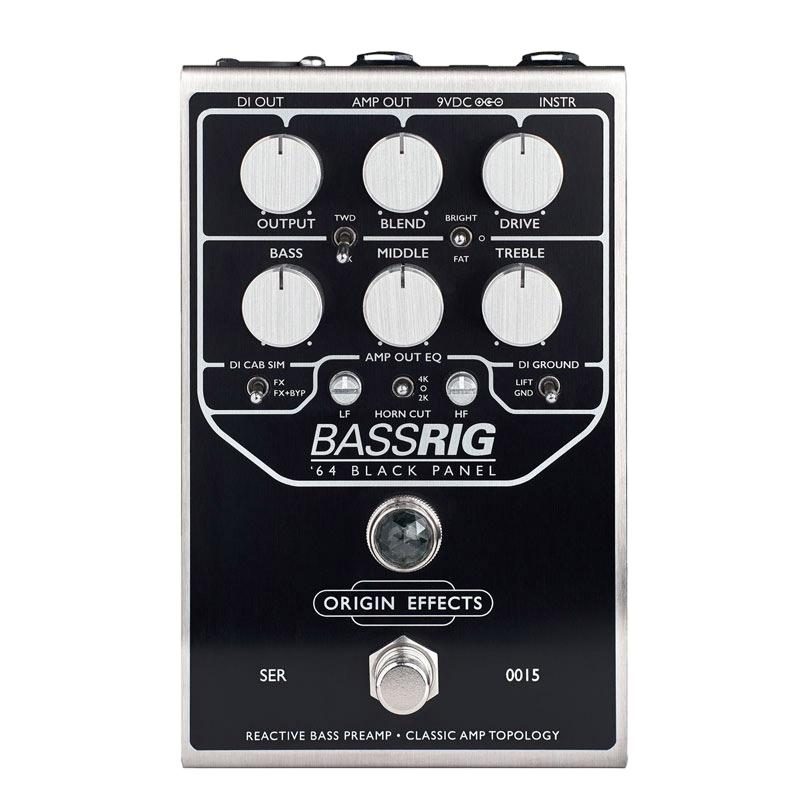
The BassRIG '64 Black Panel is an analog recreation that pays utmost homage to the sound of mid-'60s Showman and Bassman® amps and 2x15 cabinets. Throughout the history of bass amplification, these powerful amp heads were trusted by everyone from soul session players to rock 'n' roll stars. ORIGIN EFFECTS believes the bass of these early sounds is unmatched, and the BassRIG '64 Black Panel delivers the warmth and grit of era-defining bass tones. D.I. output included. 9VDC (min 150mA) (adapter not included). This compact, immersive reproduction pays utmost homage to the sound of mid-'60s Showman and Bassman® amps and 2x15 cabinets. Click here to listen (external site). Features: The BassRIG '64 Black Panel is an analog recreation that pays utmost homage to the sound of mid-'60s Showman and Bassman® amps and 2x15 cabinets. Throughout the history of bass amps, these powerful amp heads were trusted by everyone from soul session players to rock 'n' roll stars. ORIGIN EFFECTS believes the bass of these early sounds is unmatched, and the BassRIG '64 Black Panel delivers the warmth and grit of era-defining bass tones. It features a 9VDC (min 150mA) D.I. output (adapter not included). It features an entire valve amp circuit in a pedal-sized design, providing all the controls you need to create the perfect bass amp tone. The BLEND knob adds and mixes the dry signal (clean signal) to maintain clarity and low-end integrity. The XLR DI output provides a line-level output from the analog cabinet simulator, allowing you to connect directly to a mixing console or other device for powerful, authentic SVTR tone. The output stage also features ORIGIN EFFECTS' exclusive Amp Out EQ post-drive filter, which can be adjusted to suit your amp. This filter ensures compatibility with any amp or cabinet, meaning you don't have to struggle to tailor your sound or compromise on clean tone.
【1. GET CONNECTED】INSTR - Input for bass or other instruments. AMP - Connect to an amplifier or power amp. DI OUT - Connect to a mixer or interface. 9VDC - Connect to a 9VDC 2.1mm (minimum 150mA) center-negative power supply.
【2. MATCH THE CONTROLS】We've provided two sample settings below to help you create the sound you're imagining. Using these settings as a starting point, you can easily adjust to create your own sound. SAMPLE SETTING: Southern Jam (Image 4) / SAMPLE SETTING: '60s Beat Group (Image 5)
【3. SET THE AMP OUT EQ】HORN CUT - When using a cabinet with a tweeter, setting the HORN CUT switch to 2K or 4K will provide a smooth overdrive tone while protecting the tweeter. LF - Controls the booming of larger cabinets or, conversely, thickens the sound of smaller cabinets. HF - Adds upper-mid presence or controls top end when used with modern hi-fi amplifiers.
【4. SHAPE YOUR VOICE】The tone control affects not only frequency response but also overdrive characteristics. TREBLE - Turn clockwise for a brighter tone and more aggressive overdrive. Turn counterclockwise for a smoother sound. MIDDLE - Turn clockwise for a warmer tone and richer overdrive. Turn counterclockwise for increased tone and clarity. BASS - Turn clockwise for a deeper low end. Turn counterclockwise for a thinner, more percussive sound. Tip: For overdriven sounds, lower BASS settings improve tightness and definition. BRIGHT/FAT - BRIGHT adds more high frequencies to the preamp at lower DRIVE settings. FAT switches the circuit from Showman to Bassman, adding warmth and depth to your sound. As DRIVE is increased, FAT mode begins to sound uncontrollable (in a good way!). BLK/TWD - The BLK setting is a so-called black panel circuit. TWD is a tweed circuit for even more gain and mids.
[5. DIAL IN YOUR OVERDRIVE GAIN] Transition from clean to drive tone, similar to turning up a classic amp without a master volume.
[6. BLEND IN YOUR DRIVE BLEND] Turn clockwise to add the dry (clean) signal of your bass guitar. This helps maintain clarity when using overdriven sounds. DI OUT - A balanced XLR output jack provides an analog-simulated line-level output of an 8x10 bass cabinet to a PA or recording interface. DI CAB SIM switch - When this switch is set to the FX position, the cabinet simulator is active only when the BassRIG Super Vintage is on. In the FX + BYP position, the cabinet simulator is always active. DI GROUND switch - Select GND if you want to use only the DI output. Select LIFT to eliminate ground loop hum when using both outputs.
【1. GET CONNECTED】INSTR - Input for bass or other instruments. AMP - Connect to an amplifier or power amp. DI OUT - Connect to a mixer or interface. 9VDC - Connect to a 9VDC 2.1mm (minimum 150mA) center-negative power supply.
【2. MATCH THE CONTROLS】We've provided two sample settings below to help you create the sound you're imagining. Using these settings as a starting point, you can easily adjust to create your own sound. SAMPLE SETTING: Southern Jam (Image 4) / SAMPLE SETTING: '60s Beat Group (Image 5)
【3. SET THE AMP OUT EQ】HORN CUT - When using a cabinet with a tweeter, setting the HORN CUT switch to 2K or 4K will provide a smooth overdrive tone while protecting the tweeter. LF - Controls the booming of larger cabinets or, conversely, thickens the sound of smaller cabinets. HF - Adds upper-mid presence or controls top end when used with modern hi-fi amplifiers.
【4. SHAPE YOUR VOICE】The tone control affects not only frequency response but also overdrive characteristics. TREBLE - Turn clockwise for a brighter tone and more aggressive overdrive. Turn counterclockwise for a smoother sound. MIDDLE - Turn clockwise for a warmer tone and richer overdrive. Turn counterclockwise for increased tone and clarity. BASS - Turn clockwise for a deeper low end. Turn counterclockwise for a thinner, more percussive sound. Tip: For overdriven sounds, lower BASS settings improve tightness and definition. BRIGHT/FAT - BRIGHT adds more high frequencies to the preamp at lower DRIVE settings. FAT switches the circuit from Showman to Bassman, adding warmth and depth to your sound. As DRIVE is increased, FAT mode begins to sound uncontrollable (in a good way!). BLK/TWD - The BLK setting is a so-called black panel circuit. TWD is a tweed circuit for even more gain and mids.
[5. DIAL IN YOUR OVERDRIVE GAIN] Transition from clean to drive tone, similar to turning up a classic amp without a master volume.
[6. BLEND IN YOUR DRIVE BLEND] Turn clockwise to add the dry (clean) signal of your bass guitar. This helps maintain clarity when using overdriven sounds. DI OUT - A balanced XLR output jack provides an analog-simulated line-level output of an 8x10 bass cabinet to a PA or recording interface. DI CAB SIM switch - When this switch is set to the FX position, the cabinet simulator is active only when the BassRIG Super Vintage is on. In the FX + BYP position, the cabinet simulator is always active. DI GROUND switch - Select GND if you want to use only the DI output. Select LIFT to eliminate ground loop hum when using both outputs.